 TapTrickTemple
TapTrickTemple
TapTrickTemple
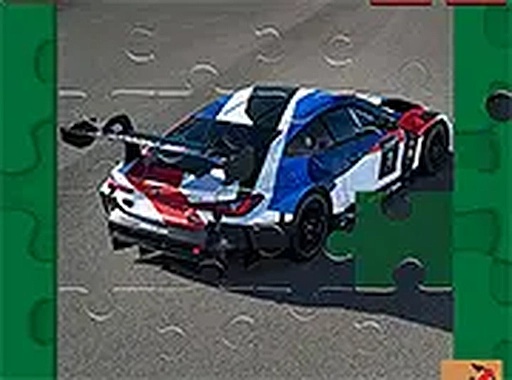
The BMW M4 GT3 Puzzle Game offers a calm and satisfying experience for car enthusiasts and puzzle lovers alike. With six high-quality images and four difficulty levels, it provides variety and challenge without being stressful. The intuitive drag-and-drop controls work smoothly on both desktop and mobile devices. The lack of time limits and the helpful hints feature make it accessible to players of all ages. It is a perfect way to unwind while sharpening concentration and problem-solving skills.
The BMW M4 GT3 Puzzle Game brings the sleek design of the BMW M4 GT3 to your screen through six distinct jigsaw puzzles. Each image showcases the car's sporty lines and performance heritage. The game offers four difficulty levels for every picture: 16 pieces for a quick session, 36 pieces for a moderate challenge, 64 pieces for a focused effort, and 100 pieces for a satisfying puzzle experience. It runs entirely in your browser without any downloads, making it easy to start playing immediately. This puzzle game is designed for car enthusiasts and anyone who enjoys a calm, engaging activity that sharpens concentration and problem-solving skills.
Select one of the six BMW M4 GT3 images. Choose your preferred puzzle mode: 16, 36, 64, or 100 pieces. The puzzle pieces appear scattered on the screen. Drag and drop each piece into the correct position to complete the image. You can rotate pieces if needed. Hints are available to assist you. The game works on both desktop and mobile devices with touch controls. Complete each puzzle to unlock the next image. The interface is simple and intuitive, allowing you to focus on the puzzle.
Six high-quality images of the BMW M4 GT3. Four puzzle modes per image: 16, 36, 64, and 100 pieces. Free to play with no downloads or registration. Compatible with desktop and mobile browsers. Full-screen mode available for an immersive experience. Hints and piece rotation support.
Start with the 16-piece mode to get familiar with the interface and image details. Sort pieces by color and edge patterns to speed up assembly. Use the hints feature if you get stuck, but try to solve as much as possible on your own to improve your puzzle skills. Rotating pieces can help you see where they fit. Practice regularly to enhance your concentration and problem-solving abilities.









Player Comments
Sign in to comment
You must be logged in before posting a review or rating.
No account? Create one
No comments yet. Be the first to comment!