 TapTrickTemple
TapTrickTemple
TapTrickTemple
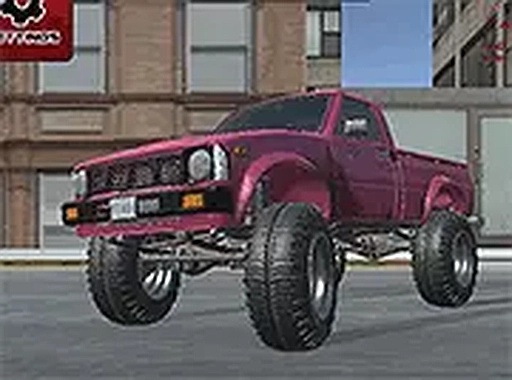
Urban Cruise 3D: Open Roads stands out for its detailed vehicle customization, letting drivers adjust everything from suspension to axle momentum. The deserted city provides a peaceful backdrop for testing those settings. Controls feel responsive on desktop, and the full-screen option enhances the view. While it lacks multiplayer or objectives, the freedom to simply drive and refine handling makes it a solid choice for fans of relaxed automotive experiences. The lack of hidden costs is a welcome bonus.
Before setting out, players can modify their car's appearance and performance. The color selection lets you choose a look that suits your style. Technical adjustments go deeper, allowing changes to spring tension, shock absorption, acceleration, handling, braking, and axle momentum distribution. These settings give you control over how the car responds on the road. Experimenting with different combinations helps you find a setup that feels comfortable for cruising through the city streets.
The game presents a deserted urban environment with wide roads and open spaces. There are no strict paths or required destinations, encouraging free movement across the map. The city includes various structures and empty lots that create a sense of exploration. Players can drive at their own pace, taking in the surroundings without time limits or pressure. The layout supports both straightforward cruising and more careful maneuvering around corners and obstacles.
Built for desktop computers, the game delivers smooth visuals and responsive controls. A full-screen mode expands the view to fill the monitor, reducing distractions and improving immersion. The graphics are optimized to run well on standard hardware, maintaining a steady frame rate during driving. Keyboard and mouse inputs handle steering, acceleration, and braking with precision, making it easy to navigate the environment.
Unlike competitive racing games, this title emphasizes a calm, exploratory approach. There are no opponents to beat or timers to beat. The main activity is driving through the empty city, observing the scenery, and getting familiar with the car's behavior. This makes it suitable for players who enjoy a low-pressure experience where they can refine their driving skills at their own pace. The absence of a fixed goal allows for repeated sessions focused on personal improvement.
The car's technical specifications offer a surprising amount of depth for a free game. Adjusting spring tension affects how the car handles bumps and turns. Shock absorption settings influence ride comfort over uneven surfaces. Acceleration and braking adjustments change how quickly the car speeds up or stops. Handling tweaks alter steering responsiveness. Axle momentum distribution affects stability during cornering. These variables let players create a vehicle that feels uniquely theirs.
As a single-player title, the game requires no internet connection to play. All features are available offline, making it a convenient option for times when connectivity is limited. The interface is straightforward, with clear menus for customization and driving. There are no hidden costs or in-app purchases, so the full experience is accessible from the start. This design makes it easy for new players to jump in and start driving without complicated setup.











Player Comments
Sign in to comment
You must be logged in before posting a review or rating.
No account? Create one
No comments yet. Be the first to comment!